Website redesign SEO: a migration and 301 redirect checklist
Most SEO losses in a website redesign come not from the new design but from old URLs that were never redirected. Before launch, list every old URL, map each one to its new address with a 301 redirect, and carry over titles, descriptions and structured data. On launch day test the redirects, then watch indexing and traffic in Search Console for the weeks that follow.
Does a website redesign hurt SEO?
A website redesign does not have to hurt SEO, and when it does, the cause is usually changed URLs that were not redirected properly rather than the design itself. Over the years Google indexed your pages, other sites linked to them and people bookmarked them. If those addresses stop working on the new site, that history is lost.
Most of that loss is preventable. Every old URL that changes needs a permanent redirect to its new equivalent, content and signals need to move with it, and the launch needs monitoring. Some ranking fluctuation in the first weeks is normal, and Google says as much for large moves. The goal is to keep it short and avoid permanent loss.
Which changes raise the SEO risk?
Changing URLs raises the risk most. If only colours, fonts and layout change while URLs and content stay the same, the risk is low. You need the full checklist if any of these apply:
- URL structure changes:
/products.php?id=12becomes/products/steel-door. - Domain changes: a rebrand or a new domain name.
- Platform changes: moving between an off-the-shelf platform and custom software, which usually changes URLs too.
- Content shrinks: old posts, product or service pages are not carried over.
- Language structure changes: languages move to different addresses.
How do you build an inventory of old URLs?
You build it by combining several sources, because none of them shows every URL on its own:
- The sitemap: lists most live pages.
- Search Console Performance report: pages that get impressions and clicks. Your most valuable pages are here.
- Search Console Links report: pages other sites link to. Every one must be redirected.
- A crawler: finds pages the sitemap misses.
- Analytics: every page visited in the last year, including old campaign pages and PDFs.
Put everything in one sheet and add three columns: recent clicks, whether it has external links, and what happens to it on the new site. That sheet becomes the 301 map.
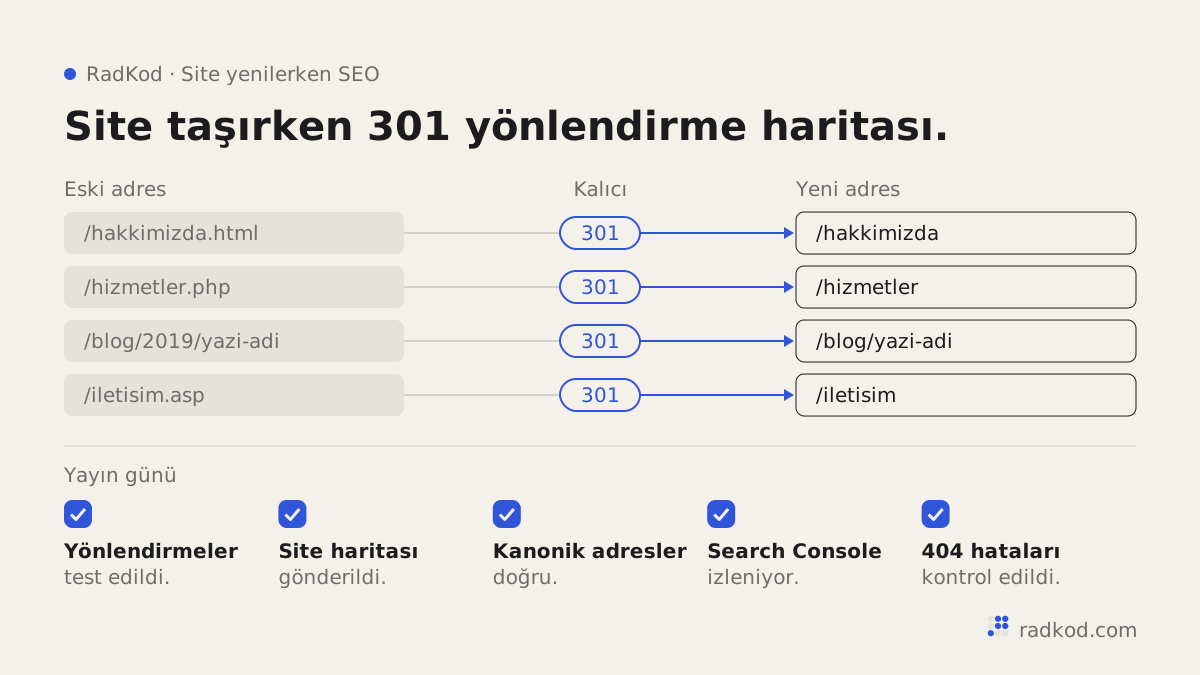
Website redesign SEO checklist: before, during and after launch
- 01 Build the inventory Combine sitemap, Search Console, crawl and analytics data into one list of old URLs.
- 02 Write the 301 map Give every old URL one new URL. Where there is no equivalent, choose the closest content or remove the page deliberately.
- 03 Move titles, descriptions and content Carry over the titles, descriptions and main copy of pages that bring traffic.
- 04 Set up structured data and canonicals Structured data, canonical tags and language tags must point to the new URLs.
- 05 Test on staging Check redirects and pages on a staging environment that search engines cannot reach.
- 06 Verify on launch day Test redirects live, remove crawl blocks, submit the sitemap, and use the Change of Address tool if the domain changed.
- 07 Monitor for weeks Check indexing, 404 errors and traffic regularly. Add missing redirects straight away.
How do you prepare a 301 redirect map?
A 301 redirect map is a table that pairs every old URL with exactly one new URL. A 301 redirect is the server response that tells browsers and search engines a page has moved permanently. Google treats permanent server-side redirects as the strongest signal of a URL change. Our rules:
- Map one to one: each old page goes to the closest new page by content. Sending everything to the home page is easy and wrong. Google may treat mass redirects like that as soft 404s.
- No chains: the old URL goes straight to the final URL, not A to B to C.
- Include parameters: query-string URLs, pagination and filter URLs belong on the list.
- Remove on purpose: pages with no equivalent, no traffic and no links can return 404 or 410.
- Keep them long: Google recommends keeping redirects for at least a year, and longer if you can. External links keep pointing at old URLs for years.
| Old URL | New URL | Decision |
|---|---|---|
| /about.html | /about | 301, one to one |
| /products.php?id=12 | /products/steel-door | 301, one to one |
| /blog/2019-campaign | /blog | 301, closest content |
| /old-catalogue.pdf | /catalogue | 301, new catalogue page |
| /test-page | None | 410, removed on purpose |
How do you carry over titles and descriptions?
Titles, descriptions and main copy of pages that bring traffic are moved deliberately, not rewritten at random. A page usually ranks for a query because of its title and content. If the new design shortens the copy, changes the title or hides the main content behind a tab, the page can lose that position. You can improve the text, but do it knowing which queries the page ranks for. Our guide to an SEO-friendly website covers the basics every page needs.
What happens to structured data and canonical URLs?
They are rebuilt on the new site and must point to the new URLs. Structured data tells search engines in machine-readable form that a page is a product, an article or a business. If the old site had product, FAQ or organisation markup, the new one needs it too, or rich results may disappear. Each page's canonical tag should point to its own new URL. The mistake we see most is canonical tags pointing at the staging domain. The same markup also helps AI-driven search understand a page, as covered in showing up in AI search.
How do you tell Search Console about the move?
If the domain changes, verify both the old and new domains in Search Console and, once the 301 redirects work, use the Change of Address tool on the old property. If only the page URLs change on the same domain, that tool does not apply. Redirects and a new sitemap are enough. In both cases submit the new sitemap and use URL Inspection on key pages. Keep the old property for a while to watch how old URLs are processed.
What do you check on launch day?
- Redirects in the map, at least the ones with traffic, reach the right new URL in one hop.
- No crawl blocks left over from staging in robots.txt or noindex tags.
- Old URLs are not blocked in robots.txt. If they are, Google cannot see the redirect.
- HTTPS works, and HTTP and www variants resolve to one address.
- The new sitemap lists only new URLs and has been submitted.
- Analytics runs on the new site, or you will have nothing to compare.
What do you monitor after launch?
Watch indexing, 404 errors, traffic and page speed. We check daily for the first two weeks, then weekly. The Page indexing report in Search Console shows whether new URLs are indexed and old ones are treated as redirects. Every not-found error is a missing redirect to add. Compare traffic page by page, not as a site total, because one important page can drop without moving the total. New designs often bring heavier images and code, so check speed too, as explained in site speed and Core Web Vitals.
What are the most common redesign SEO mistakes?
The most common mistake is not redirecting old URLs at all. The rest usually come from launch-day haste.
| Mistake | Result | Prevention |
|---|---|---|
| Old URLs not redirected | Indexed pages and external links return 404. | Full inventory and 301 map before launch. |
| Everything redirected to the home page | Google may treat them as soft 404s. | Each URL to its closest page. |
| Staging block carried to live | The site drops out of the index. | Check robots.txt and noindex on launch day. |
| Temporary redirects used | Weaker signal of a permanent move. | 301 for permanent moves. |
| Redirect chains | Slower, more error-prone. | Old URL straight to final URL. |
| Structured data forgotten | Rich results may disappear. | Rebuild the old markup on new pages. |
| Redirects removed after a few months | Old links break again. | At least a year, longer if possible. |
How does RadKod handle a redesign?
We start with the inventory, before design. The URL list and 301 map are a separate line in the quote and part of the definition of done: the work is not finished until every old URL with traffic reaches the right new URL in one hop. The new site is built on staging first, redirects are tested there, then it goes live. The domain, server and Search Console access are in your name. Bugs in the 30 days after launch, missing redirects included, are fixed free. The person you talk to builds the site. See web design for how we work on websites.
Frequently asked questions
How long do rankings take to recover after a redesign?
There is no fixed time. Google says most pages of a medium-sized site can take a few weeks to move. With correct redirects the fluctuation is usually temporary.
What is the difference between a 301 and a 302?
A 301 is permanent, a 302 is temporary. A redesign changes URLs permanently, so use 301.
How long should redirects stay in place?
Google recommends at least a year. Because external links point to old URLs for years, we suggest keeping them longer.
If URLs do not change, do I still need to prepare?
Yes, but less. Still check that titles, descriptions, structured data and content moved, that nothing blocks crawling, and that speed did not drop.
Does deleting old blog posts hurt?
Deleting posts with traffic or external links can. Move them or redirect them to the closest content. Posts with no visits can be removed.
What do I do in Search Console when the domain changes?
Verify both domains, set up 301 redirects, use the Change of Address tool on the old property and submit the new sitemap.
Can the staging site show up in Google?
It can if it is not protected. Password protection is the safest option. On launch day, confirm that protection did not carry over to the live site.
Sources
- 01 Site moves with URL changes · Google Search Central
- 02 Redirects and Google Search · Google Search Central
- 03 Learn about sitemaps · Google Search Central
- 04 Introduction to structured data markup in Google Search · Google Search Central
- 05 How to specify a canonical URL · Google Search Central