Site speed and Core Web Vitals: what LCP, INP and CLS mean and how to fix them
Core Web Vitals are three Google metrics: how fast the main content appears (LCP), how fast the page responds to input (INP) and how much it shifts while loading (CLS). To count as good, LCP should be 2.5 seconds or less, INP 200 milliseconds or less and CLS 0.1 or less. The usual culprits are heavy images, heavy scripts and elements without reserved space.
What are Core Web Vitals?
Core Web Vitals are three metrics Google uses to measure user experience on a page: how fast the main content appears, how quickly the page responds to input, and how much the layout shifts. They are called LCP, INP and CLS.
Google says its ranking systems use Core Web Vitals, and in the same breath says good page experience does not override relevant content. Speed will not carry a weak page to the top. A slow page, though, loses readers before they start.
What is LCP and what is a good score?
LCP (Largest Contentful Paint) is the moment the largest image or text block becomes visible, and it should be 2.5 seconds or less. Over 4 seconds is poor. It is usually the hero image, a product photo or the first paragraph: the moment a visitor feels the page has loaded.
Common causes: oversized images, a slow server response (web.dev suggests a time to first byte under 0.8 seconds), render-blocking CSS and JavaScript, lazy loading applied to the hero image, and pages rendered entirely in the browser.
What is INP and what is a good score?
INP (Interaction to Next Paint) is the time from a click, tap or key press until the page visibly responds, and it should be 200 milliseconds or less. Over 500 milliseconds is poor.
INP replaced FID in March 2024. FID only looked at the first interaction. INP observes interactions throughout the visit and reports one of the slowest. The usual causes are long JavaScript tasks (anything over 50 ms blocks input), piles of third-party scripts, very large pages and theme plugins that load code you never use.
What is CLS and what is a good score?
CLS (Cumulative Layout Shift) is a score for how much content moves unexpectedly, and it should be 0.1 or less. Over 0.25 is poor. It is the moment you go to tap a link, an image loads above it and you tap something else. CLS is not measured in seconds but as a score based on how much of the screen moves and how far.
Common causes: images without width and height, cookie banners or promo bars that push content down, ads and embeds without reserved space, and web fonts that change line heights when they load.
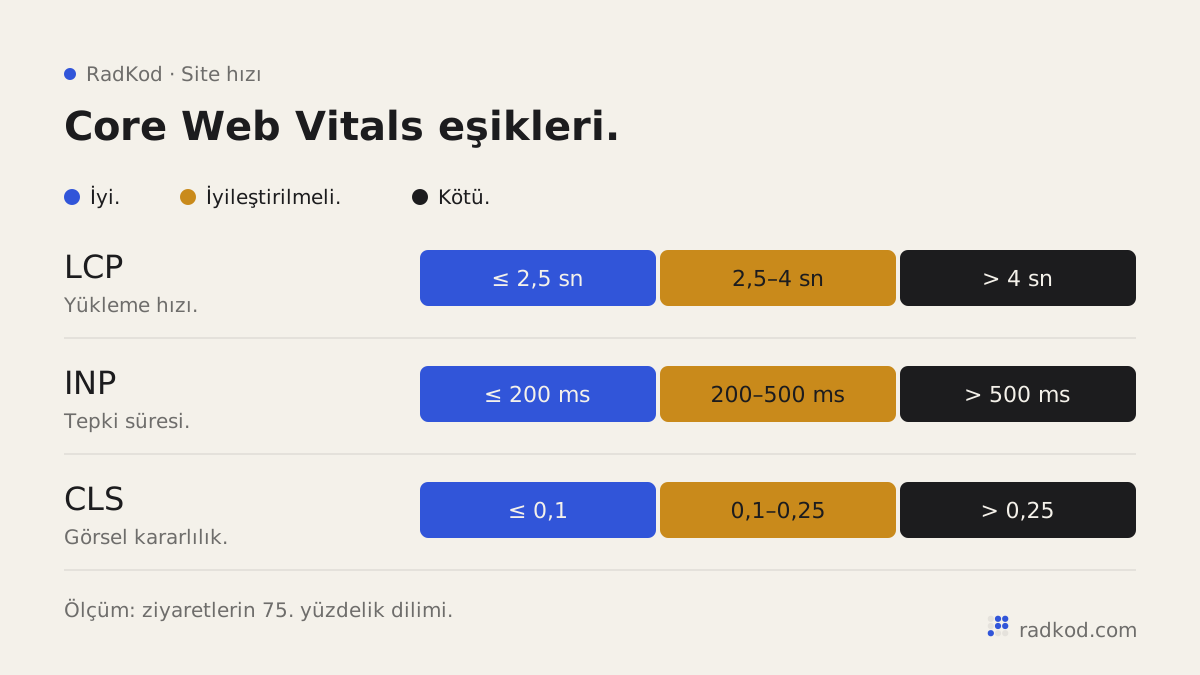
| Metric | Measures | Good | Needs improvement | Poor |
|---|---|---|---|---|
| LCP | Main content load time | 2.5 s or less | 2.5 – 4 s | Over 4 s |
| INP | Response to interaction | 200 ms or less | 200 – 500 ms | Over 500 ms |
| CLS | Unexpected layout shift | 0.1 or less | 0.1 – 0.25 | Over 0.25 |
How do you measure Core Web Vitals?
The simplest way to measure Core Web Vitals is with PageSpeed Insights and Google Search Console. Both are free and both come from Google.
Know the two kinds of data. Field data comes from real Chrome users, is published as the Chrome UX Report (CrUX) and covers the last 28 days. Google's assessment is based on it. Lab data is a single test run by a tool under fixed device and network assumptions. It is great for finding problems, but it is not what your visitors experience.
- PageSpeed Insights: enter a URL. Field data appears at the top if there is enough traffic, with a Lighthouse lab test and suggestions below. Mobile and desktop are reported separately.
- Search Console Core Web Vitals report: covers the whole site, grouping similar pages and flagging which group fails which metric. New, low-traffic sites may see no data.
- Chrome DevTools: the Performance panel shows exactly which script or image is at fault. Developer territory.
Assessment uses the 75th percentile: a page is good on a metric when at least three quarters of visits meet the threshold. One quick test on a fast laptop over fibre tells you little. Most of your visitors are probably on phones and mobile data.
| Metric | Cause | Fix |
|---|---|---|
| LCP | Large, uncompressed image | WebP or AVIF, correct dimensions, srcset for different screens |
| LCP | Hero image is lazy loaded | Remove lazy loading from the first visible image and add fetchpriority="high" |
| LCP | Slow server response | Page caching, current runtime, fixed database queries, a CDN where needed |
| LCP | Render-blocking CSS and JS | Remove unused code, defer scripts, inline critical CSS |
| LCP | Content rendered in the browser | Render on the server (SSR) so the HTML arrives complete |
| INP | Long JavaScript tasks | Break work into smaller chunks and defer heavy work until after the response |
| INP | Too many third-party scripts | Remove unused tags and load the rest later |
| INP | Heavy theme plugins | Disable what you do not use or replace it with lean code |
| CLS | Images without dimensions | Set width and height or reserve space with aspect-ratio |
| CLS | Late banners and notices | Reserve their space or show them as an overlay |
| CLS | Font swap moves text | Preload fonts and pick a fallback with similar metrics |
| CLS | Ads and embeds | Fix the container size in advance |
The order we fix Core Web Vitals in
- 01 Start with field data Open the Core Web Vitals report in Search Console and note which page groups fail which metric. Start with mobile.
- 02 Pick a sample page Take one URL from each failing group and test it in PageSpeed Insights. Pages sharing a template usually share the problem.
- 03 Take the biggest win first On most sites that is images. Fixing format, size and load priority usually moves LCP noticeably.
- 04 Count the scripts List every third-party script and ask who actually uses it. Removing one helps INP and LCP at once.
- 05 Reserve space Give images, embeds and banners their space up front. This usually settles CLS.
- 06 Validate the fix Lab scores change immediately. Field data covers 28 days, so Search Console takes a few weeks. Use the report's validate fix button to start tracking.
Why are theme-based sites slow more often?
Theme-based sites are slow more often because a theme is written to cover every buyer's needs, and the code for features you never use still loads on every page. Each plugin adds another script, stylesheet or query. A well-chosen, lean theme can still perform well, but not writing unneeded code is easier than removing it later. We compare both routes in theme or custom design.
How do we build for speed from the start?
We render pages on the server, so the browser receives complete HTML. This is called SSR, and it lets content appear without waiting for JavaScript, which helps both LCP and search engines. Images get the right format and size in code, with width and height always set. The first visible image loads with priority and the rest lazily. Third-party scripts are added only when used and never block rendering. Static files are cached for long periods, through a CDN where it helps.
Before launch we test the home page and one page of each type in PageSpeed Insights and note the results in the handover. These checks are part of the definition of done on our web design projects. New content and scripts can slow a site over time, so regular measurement is part of maintenance and support. For how speed fits the rest of SEO, see what makes an SEO friendly website.
Frequently asked questions
How much do Core Web Vitals affect rankings?
Google says its ranking systems use them, but that relevant content matters more. They can separate pages of similar quality. Speed does not rescue weak content.
Do I need a PageSpeed Insights score of 100?
No. The 0 to 100 score is a lab result, not Google's assessment. What matters is that field data shows LCP, INP and CLS in the good range.
Why do PageSpeed Insights and Search Console disagree?
PageSpeed Insights tests one URL at one moment. Search Console shows 28 days of real-user data grouped by page type. Lab results also vary between runs. Decide on field data.
Why is my Core Web Vitals report empty?
The report relies on real Chrome user data. New or low-traffic sites may not have enough. Use the PageSpeed Insights lab test in the meantime.
Is FID still used?
No. INP replaced FID in March 2024. The current Core Web Vitals are LCP, INP and CLS.
Will a faster server fix it?
Only if the server is the bottleneck. If the problem is images, scripts or shifting elements, new hosting changes little. Measure, find the cause, then spend.
How long until fixes show up?
Lab scores change immediately. Search Console field data covers the last 28 days, so it settles over a few weeks.
Sources
- 01 Web Vitals · web.dev
- 02 Largest Contentful Paint (LCP) · web.dev
- 03 Interaction to Next Paint (INP) · web.dev
- 04 Cumulative Layout Shift (CLS) · web.dev
- 05 Understanding Core Web Vitals and Google search results · Google Search Central
- 06 PageSpeed Insights · Google