E-invoice integration in Turkey: how e-Fatura and e-Arşiv work
In Turkey, invoices are issued electronically through a system run by the Revenue Administration (GİB). If the buyer is registered for e-invoicing, you issue an e-Fatura. If not, you issue an e-Arşiv invoice. Most businesses connect their software through a GİB-authorised special integrator, test in the integrator's test environment, then go live.
What is e-invoice integration in Turkey?
E-invoice integration in Turkey means your online shop, CRM or internal system issues invoices itself and sends them electronically through the national system. If orders live in one system and someone types the invoices into another screen by hand, integration joins the two steps. When a sale is confirmed, the invoice is created, delivered and recorded.
Turkey was early to make electronic invoicing part of its tax system. The Revenue Administration, Gelir İdaresi Başkanlığı or GİB, runs it. Many businesses are required to use it, and the scope has widened over the years. If you are setting up a Turkish company, running a subsidiary here or building software for Turkish clients, you will meet it quickly.
This post explains how the system works in general. Tax rules change. For thresholds, deadlines and document rules, always check GİB's current announcements and ask a Turkish accountant, a mali müşavir.
What is the difference between e-Fatura and e-Arşiv?
The difference is the buyer. If the buyer is registered in the e-invoicing system, you issue an e-Fatura. If the buyer is not registered, you issue an e-Arşiv invoice.
An e-Fatura travels between two registered users inside the system, from the seller's system to the buyer's electronic inbox. An e-Arşiv invoice is issued electronically to someone outside the system, typically a consumer, and delivered by email or a similar channel. The invoices you issue this way are reported to GİB.
So your software has to check whether the buyer is registered before it issues an invoice. GİB publishes the list of registered users, and special integrators offer the same lookup through their own API.
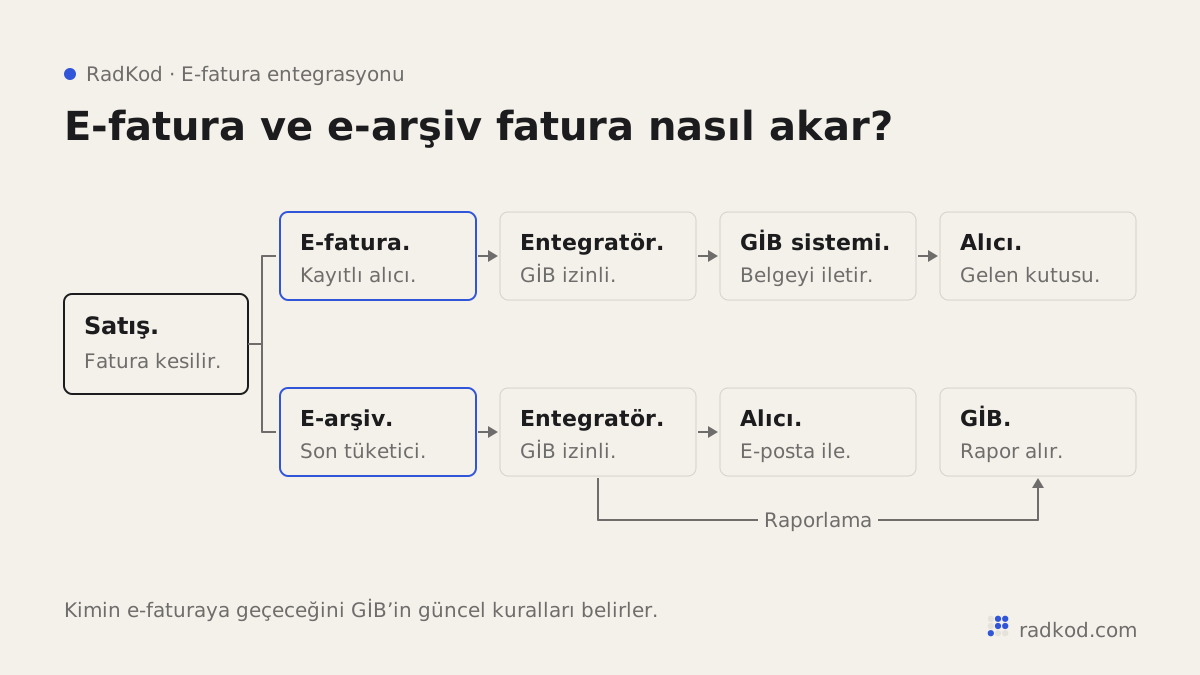
| e-Fatura | e-Arşiv invoice | |
|---|---|---|
| Buyer | Registered e-invoice user | Unregistered buyer, such as a consumer |
| Delivery | Through the system to the buyer's inbox | By email or similar, printed on request |
| Relation to GİB | Sent through the system | Issued invoices are reported to GİB |
| Typical use | Business-to-business sales | E-commerce and retail sales |
How does an invoice reach GİB?
There are three routes: GİB's own portal, a special integrator, or a direct integration. The portal is for issuing invoices by hand in a browser. It can be enough for a business with few invoices, but it does not work automatically with your own software.
A special integrator, özel entegratör in Turkish, is a company authorised by GİB to send invoices into the system on your behalf. Your software connects to the integrator's API, a defined door that lets two pieces of software exchange data. GİB publishes the current list of authorised integrators on its e-Belge site.
Direct integration means connecting your own system to GİB. It comes with heavier technical and administrative requirements. For most businesses, a special integrator is the practical route.
What does a special integrator do?
The integrator handles creating the invoice in the right format, signing it, sending it and storing it. Turkish e-invoices are XML documents in a national profile of the UBL standard called UBL-TR. They are signed with a financial seal, mali mühür, or an electronic signature. The integrator deals with these details and gives you a simpler interface.
When choosing one, check:
- Is it on GİB's list of authorised integrators?
- Does it have a documented, current API?
- Does it offer a separate test environment?
- Can it handle e-Fatura and e-Arşiv through the same connection?
- Does it support other documents you may need, such as the electronic delivery note (e-İrsaliye)?
- How do you reach support when something breaks, and in which language?
How we build an e-invoice integration
- 01 Preparation With your accountant, you confirm which document types you need. The integrator is chosen and the application and financial seal steps are started early, because they take time on their own.
- 02 Mapping Customers, products, VAT rates and units in your software are mapped to the fields on the invoice.
- 03 Development We write the code that creates the invoice when a sale is confirmed, checks the buyer type and sends it to the integrator.
- 04 Status tracking Whether each invoice was delivered or rejected is written back into your system. If the integrator supports it, a webhook reports this instantly.
- 05 Testing Every scenario is tried in the integrator's test environment before a single real invoice is issued.
- 06 Going live The first real invoices are issued in a controlled way and checked by a person together with your accountant.
Why does the test environment matter so much?
A test environment lets you try everything without issuing a real invoice. A wrong invoice issued live has tax consequences and is tedious to correct. That is why most integrators provide a separate test system. In general, a staging environment is a copy of the live system where you can experiment safely.
Test these cases at the very least: a registered and an unregistered buyer, different VAT rates, a discounted line, foreign currency if you need it, the return process, what happens when the connection drops, and that the same invoice is never sent twice. Status updates often arrive through a webhook, a message one system sends another when something happens, so test that path too.
What should you watch when going live?
Have a person check the first invoices. In the first days, review them with your accountant. Make sure invoice numbers, dates and amounts are correct.
- Make sure test and live credentials never mix.
- Set up alerts and a retry routine for invoices that fail.
- Agree the rules for cancellations and returns with your accountant. They differ by document type.
- In the commercial invoice scenario, the buyer may have the right to accept or reject the invoice within a set period. Make sure those responses reach your system.
Does this apply to foreign companies?
The obligations apply to taxpayers in Turkey. If you operate through a Turkish company or branch, that entity follows the Turkish rules, and its software has to issue invoices through the system. Export sales and sales to foreign buyers have their own scenarios and rules. Whether and how they apply to your setup is a question for a Turkish accountant or tax adviser, not for your developer.
What we can tell you is how the software side works, and that it is similar whatever the business: the sales system decides the document type, sends it through an integrator and records the result.
Which software can connect to e-invoicing?
Almost any software that records sales can be connected. The links we build most often are for online shops, CRM and order systems, accounting software and marketplaces. When the order and the invoice live in the same place, manual copying and typos disappear.
After the invoice is issued, the record also needs to reach accounting. We cover that step in accounting and ERP integration. If your orders come from marketplaces, see marketplace integration.
What do you get at handover?
You get a working connection, the access details and a short usage note. Our handover list usually includes the integrator account and API keys in your name, the list of scenarios that passed in testing, a note on where to monitor failed invoices, and the code in your own repository. We build these under our integrations service, and new sales channels under e-commerce. Our definition of done is plain here too: every scenario has passed in testing, and the first live invoices have been checked with you.
Frequently asked questions
Is e-invoicing mandatory in Turkey?
For many businesses, yes. Whether it applies to you depends on criteria such as turnover, sector and type of activity, and the rules have changed over time. Check GİB's current announcements and ask a Turkish accountant.
What is the difference between e-Fatura and e-Arşiv?
The buyer decides it. An e-Fatura goes to a buyer registered in the e-invoicing system, while an e-Arşiv invoice goes to an unregistered buyer, such as a consumer. Your software checks the buyer's status and picks the right document.
Do we need separate integrations for e-Fatura and e-Arşiv?
Usually not. Most special integrators offer both through the same connection. Your software chooses the document type based on the buyer.
What is a special integrator (özel entegratör)?
It is a company authorised by GİB to create, sign, send and store electronic invoices on your behalf. Your software talks to its API instead of connecting to GİB directly. GİB publishes the list of authorised integrators on its e-Belge site.
What is UBL-TR?
UBL-TR is the Turkish profile of the international UBL XML standard for business documents. Turkish e-invoices are produced in this format and then signed. A special integrator usually builds the XML from the data your software sends.
Can we change integrators later?
Yes. If the part of the software that talks to the integrator is kept separate, switching takes much less work. Ask your accountant about the administrative steps of the move.
How long does an e-invoice integration take?
It depends on your software and how many document types you need. Administrative steps such as the integrator application and the financial seal take their own time, so we start them first. We write the development and testing timeline into the definition of done once we have seen the scope.
Can an online shop issue e-Arşiv invoices automatically?
Yes. When an order is confirmed, the shop creates the invoice, sends it to the integrator and emails it to the buyer. Returns and cancellations get their own rules, and manual invoicing disappears.
Sources
- 01 e-Belge · Gelir İdaresi Başkanlığı
- 02 Gelir İdaresi Başkanlığı · Gelir İdaresi Başkanlığı