What does mobile app development cost depend on
Mobile app cost depends on how many platforms the app runs on, what each screen does, the backend and admin panel behind it, the integrations it needs and the upkeep after launch. Most of the budget usually goes to the system behind the screens. When the scope is written on day one, the price is fixed from the start.
What does mobile app cost depend on?
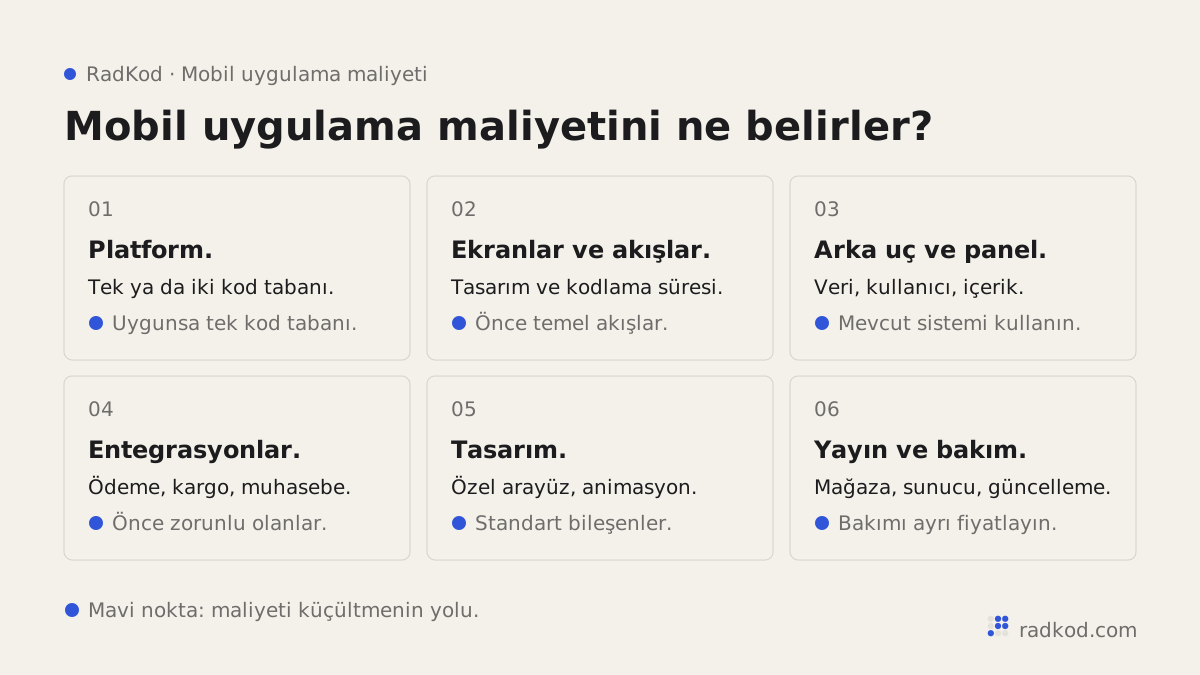
Mobile app cost depends on what the app does, how many platforms it runs on and how much system sits behind it. Two apps that look alike can be far apart in price. One shows content. The other takes payments, sends notifications and pushes orders to your accounting software.
We will not quote numbers here. A number given before the scope is written is either wrong or it changes later. If you know the cost items, you can compare quotes properly.
One platform or two?
Two platforms do not have to mean double the cost. Build natively in Swift for iOS and Kotlin for Android and you maintain two codebases. Build with Flutter or React Native and most of the work is done once for both. For most business apps, a shared codebase is enough. We compare the options in native or Flutter.
Why is the backend often the largest item?
The backend is the part you never see on the phone, and it usually carries most of the work. Accounts, orders, content and notification rules live there. The app talks to it through an API, a defined door that lets two pieces of software exchange data.
Then there is the admin panel: the web screen your team uses to add products, approve orders or message users. It is easy to miss in a quote, yet your team will use it every day. Ask whether it is included and what it can do.
Which features push the price up?
Features that talk to outside systems or work in real time add the most. The usual suspects:
- Payments: cards, refunds and in-app purchases.
- Push notifications: and the rules for who gets what, and when.
- Maps and location: address search, nearest branch, live tracking.
- Chat: between users or with your support team.
- Offline mode: entering data without a connection and syncing later.
- Other systems: accounting, invoicing, shipping, CRM or your existing website.
What costs come after launch?
After launch you pay for store accounts, servers and updates. The Apple Developer Program is a yearly membership. A Google Play developer account has a one-time registration fee. Check current fees on their own pages. If you sell digital content inside the app, store commission rules apply as well.
The item people forget is updates. Apple and Google release new OS versions every year and their store rules change. The app needs to keep up, which is why we price maintenance and support separately and upfront. Bug fixes are free for 30 days after handover. After that, monthly maintenance is optional.
How do you lower the cost without cutting corners?
Cut scope, not quality. Launch the smallest version that does the job, an MVP. Once real people use it, you build the next version on evidence instead of guesses.
For a solid quote, tell us who will use the app, what they will do first and most often, which platforms you need, which systems it must connect to and whether there is a launch date. We reply with a one-page quote, then sign a definition of done before work starts. See the full process on how we work, and what we build on mobile app development.
Do you need an app, or is a mobile-friendly site enough?
If people will not open it often, a mobile-friendly website is usually enough and costs less. Nobody installs an app to read a page once, check a campaign or place an order every few months. A site that works well on a phone does that job. That is responsive design: the page rearranges itself for the screen.
An app earns its place when users come back several times a week. Push notifications, camera and location access, and a fast path for signed-in users are its strengths. There is a middle road too. A PWA is a web app that runs in the browser but can be added to the home screen. It suits some jobs well, but its access to device features and its visibility in the stores are more limited than a store app.
Ask one question: how often does the user do this, and how much does it depend on the phone? If the answer is "now and then", improve the site first. If it is "every day", the app budget is worth discussing.
Which budgeting mistakes make apps cost more?
The most common mistake is budgeting only for the screens you can see on the phone. These come up again and again at the quote stage:
- Forgetting the admin panel: the app is ready, but nobody knows who updates the content, or where.
- Putting everything in version one: chat, loyalty points, several languages and maps all at once.
- Ignoring upkeep: yearly OS changes are not in the budget, and after a while the app can no longer be updated in the store.
- Missing usage-based fees: SMS, maps and push services can charge more as your user base grows.
- Letting someone else own the accounts: a store account in the developer's name makes moving the app painful later.
- Comparing quotes by total only: the cheaper quote may leave out the panel, testing or store submission.
We show how to line quotes up item by item in how to compare software quotes.
What does a worked example look like?
Cost items appear once you write down which rule runs at each step. Take a hypothetical salon with a few branches that wants customers to book from their phones. On the phone there are sign-up, login, branch and service choice, open time slots, booking confirmation and booking history. Behind it sit branches, staff, service durations and opening hours, plus rules that stop two bookings landing in the same slot. In the admin panel, staff see the day's calendar and cancel or move bookings.
Online payment, loyalty points and a second language can wait for version two. Ask for all of it on day one and the work grows noticeably. The difference comes from the rules behind the screens, not the screen count.
Check that your mobile app quote includes
-
Admin panel
Whether there is one, and exactly what your team can do in it.
-
Backend and servers
Where data lives, whose name the server is in and who pays the monthly bill.
-
Platforms
iOS, Android or both, and whether it is one shared codebase or two native apps.
-
Store submission
Screenshots, privacy details and the review process, stated as included or not.
-
Testing
Which devices and which OS versions the app will be tested on.
-
Maintenance
The free bug-fix period after handover and the scope of monthly upkeep, on their own lines.
Frequently asked questions
Why can't you give me a price right away?
Because what the app does sets the price, not the screen count. A short call clears up the scope, then we send a one-page quote.
Do I pay separately for iOS and Android?
With a shared codebase you pay for one piece of work. If separate native apps are needed, the quote says so plainly.
Whose name are the store accounts in?
Yours. Store accounts, servers and the code repository belong to you from day one. We are added as authorised users.
How long does it take to build a mobile app?
It depends on scope. A first version with the core flows can go live in a few weeks, while an app with a heavy backend and several integrations takes a few months. We write the end date into the definition of done on day one and deliver on that date.
What does a mobile app cost per month after launch?
Monthly cost is servers, third-party services and optional maintenance. Push, SMS and map services often charge by usage, so they grow with your user base. The yearly Apple developer fee belongs in the same budget. We list each item on its own line in the quote.
Is an app cheaper if I already have a website?
Usually yes, if the website already has an API or an admin panel behind it. The app reuses the same data, so most of the backend does not need to be rebuilt. If the site is only static pages, the backend still has to be built.
Is Flutter cheaper than native development?
For an app that needs both iOS and Android, a shared Flutter or React Native codebase usually means less work. For a single platform the gap shrinks. The right choice depends on how much the app relies on device features.
Do I pay extra if the App Store rejects the app?
If a rejection comes from a feature within the agreed scope, we fix it. If it comes from a new request that breaks store rules, we tell you before building it and put the impact in writing. Checking the store guidelines during design prevents most rejections.
Sources
- 01 Apple Developer Program · Apple
- 02 Get started with Play Console · Google