Who should own your domain and hosting
Your domain and hosting should always be registered to the company that owns the website. Agencies and developers are added as authorised users, not owners. That way, if you part ways, your site and your email stay with you.
Who should own your domain?
The company that owns the website should own the domain. If the registrant shown is your agency, a former employee or a freelancer, the keys to your site are in someone else's pocket.
This is about order, not trust. People change jobs, companies close and email addresses get forgotten. When accounts are in your name and tied to your company email, none of that touches your website.
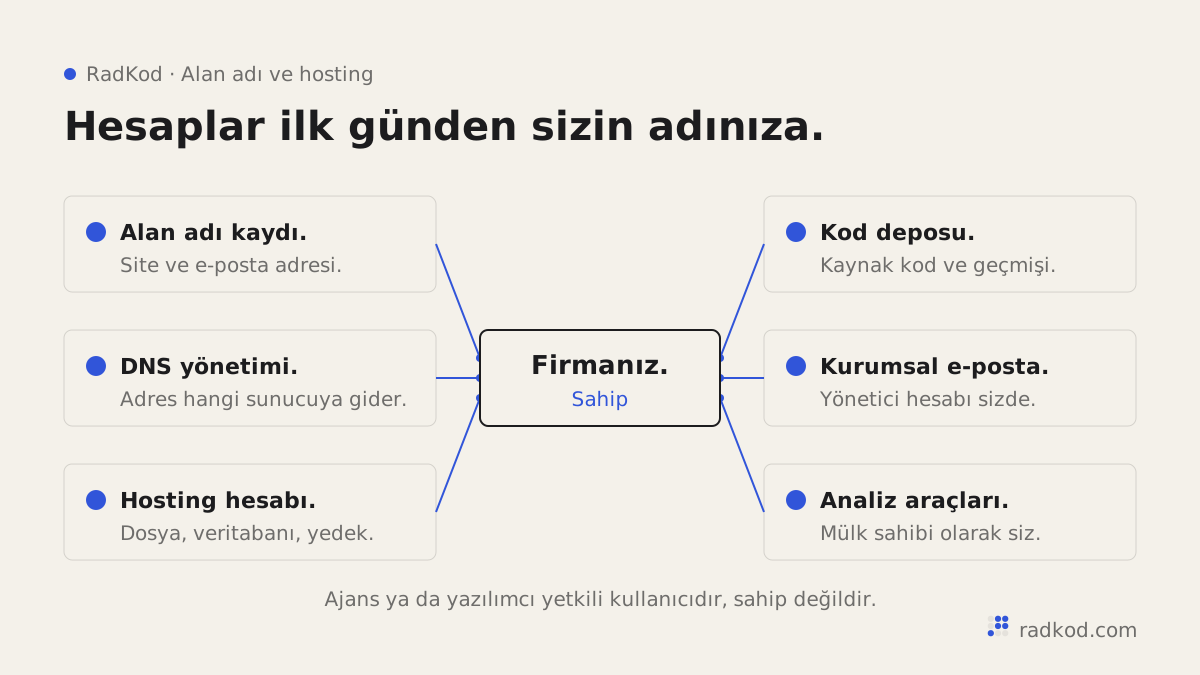
On every project we open the domain, server, code repository and all related accounts in the client's name from day one. We add ourselves only as authorised users. If you want to leave, one email is enough and you remove our access.
What goes wrong when someone else owns it?
When the domain is registered to someone else, you depend on them for renewals, transfers and DNS changes. The rights to a domain name sit with the registrant, so on paper it is not yours.
- Renewals get missed: reminders go to the registrant, not to you. If it expires, your site and email stop together.
- Transfers get harder: the code needed to move a domain to another registrar is issued to the registrant.
- Your email is exposed: company email runs on the same domain. Whoever controls the domain controls where mail goes.
- You lose leverage: in a billing or contract dispute, access can become a bargaining chip.
Which accounts should you check?
Check every account your website depends on, not just the domain. Hosting is a separate account. Even if the domain is yours, you may not reach the site files or backups if the server account belongs to someone else.
- Domain registration: is your company the registrant, and is the contact email yours.
- DNS management: do you have the login.
- Hosting or cloud account: is it in your company name, and do you see the invoices.
- Code repository: does it live in your account, with the team invited.
- Company email: do you hold the admin account.
- Analytics and search tools: are you listed as the owner.
How do you take the accounts back?
The easiest way is to ask for a written transfer while the relationship is still good. Most people agree without fuss.
- List every account, using the checklist above.
- Open new accounts in your company name, with a company email.
- Request a change of registrant or an internal push for the domain.
- Move the server and repository to your account, or take over ownership.
- Remove old access and change the passwords.
For generic domains such as .com, changes of registrant and moves between registrars follow ICANN's Transfer Policy, which may lock the domain for a period after a change. Ask your registrar for the details.
If the other side cannot be reached, it takes longer but is usually solvable. When a project was left half done, our project takeover service covers the whole handover. For new sites, write ownership into the contract from the start, as we do in our web design work. Our how we work page lists the four rules we sign up to.
How should you give an agency access to your accounts?
Give an agency access by adding it as a separate user on each account, not by sharing your password. Most registrars, cloud providers and code repository services support this. Each person gets their own login, and you can remove anyone at any time.
- Grant only the access the job needs. Someone who edits DNS records does not need billing rights.
- Keep the owner role inside your company, ideally held by two different admins.
- Turn on two-factor authentication on every account.
- Remove old users when a project ends or the team changes.
Where should account details be stored?
Store account details in a password manager your company controls, with each account tied to a shared company email address. An account tied to a personal address or to one employee's phone can stay locked when that person leaves.
Use an address that more than one person can read for registration and billing. Renewal reminders, security alerts and transfer approvals all arrive there. Keep the recovery codes for two-factor authentication in the password manager too. If a phone is lost, those codes are the way back in.
Which accounts should you check when an employee leaves?
When an employee leaves, first check every account opened in their name or tied to their email. For the website, the critical ones are the domain, DNS, hosting, the code repository, email administration and analytics. If any of them is tied to a personal address, move it to a company address before the person leaves.
On the last day, remove their access and change any shared passwords. The checklist earlier on this page works for this too.
Taking over accounts at the end of a project, step by step
- 01 Ask for the account list Request a written list of every account the site depends on: domain, DNS, hosting, code repository, email, analytics and third-party services.
- 02 Confirm ownership Log in to each account with your own company email and check that you appear as the owner. Being handed a password is not a transfer.
- 03 Check the code repository Make sure the repository sits in your account and holds the latest code. The code on the live site and in the repository should match.
- 04 Find out where the backups are Ask in writing where backups are kept, how often they run and how a restore is done.
- 05 Note the renewal dates Put the renewal dates of the domain, SSL and paid services in a calendar. Check that auto-renew is switched on.
- 06 Tidy up access Keep the team as authorised users or remove them. Change the passwords and turn on two-factor authentication.
What if the other side refuses to hand over the domain?
If the other side refuses, repeat the request in writing with your reasons, then contact the registrar where the domain is held. Most disputes end once the request is written down and clear.
When you contact the registrar, documents that show the domain belongs to your company help: invoices, the contract, a trademark registration and records showing the domain has served your website for years. Rules differ by registrar and by extension, so ask your registrar which evidence it accepts.
If it turns into a legal dispute, ask your legal adviser for the details. In the meantime, try to secure a copy of the site content and data. With a copy in hand, the site can be ready on another server while the domain question is settled.
What should a yearly domain and hosting check cover?
Once a year, log in to your domain and hosting accounts and check ownership, renewal dates and the user list. It takes little time and catches most problems before they happen.
- Is your company still the registrant, and does the contact email still work.
- Is auto-renew on, and has the card on file expired.
- Does the user list include people or agencies you no longer work with.
- When was the last backup taken, and has a restore ever been tested.
- Does the SSL certificate renew automatically, and when does it expire.
- Are there DNS records left over from services you no longer use.
This check can also be part of a maintenance plan. Our website maintenance guide explains what regular upkeep covers.
Frequently asked questions
My agency registered the domain in its own name. Is that allowed?
Usually it is not forbidden, but it is risky for you. The rights sit with the registrant. Ask for a written transfer.
Will my site go down if I move the domain to another registrar?
Not if it is done properly. If the DNS records stay the same, the site and email keep working. Write down the current records before you start.
Should my developer have access to these accounts?
Yes, as an authorised user, not as the owner. You should be able to remove that access yourself at any time.
How do I find out who owns my domain?
The most reliable way is to log in to your registrar and check the registrant field. Public lookup tools work for generic domains, but personal details are often hidden. If you cannot log in at all, that is already a warning sign.
What happens if my domain expires?
When a domain expires, the website and every email address on it stop working. Registrars usually offer a short grace period to renew, but after that the domain can be registered by someone else. Turn on auto-renew and make sure the reminders reach you.
How long does a domain transfer take?
For generic domains, a transfer between registrars usually completes within a few days. It needs the transfer code and the registrant's approval. If the registrant changed recently, a transfer lock may apply for a period.
What if my agency pays the hosting bill?
Who pays matters less than whose name the account is in. If possible, move the account to your company and pay the provider directly. The agency can stay on as an authorised user.
Sources
- 01 Registrants' Benefits and Responsibilities · ICANN
- 02 Transfer Policy · ICANN